
Timerって何?
一定時間ごとに何かの処理をさせたい。そういうことってよくありますよね。こういうときに役立つのが「タイマー」です。なかなか便利な機能ですが、ver. 1.3から用意された比較的新しい機能であるためか、意外に知らない人も多いようです。
タイマー機能を実現するクラスは「Timer」というものです。これは、java.utilパッケージに用意されています。これを利用するためには、Timerの他に「TimerTask」というクラスも必要になります。基本的な使い方を整理すると以下のようになります。
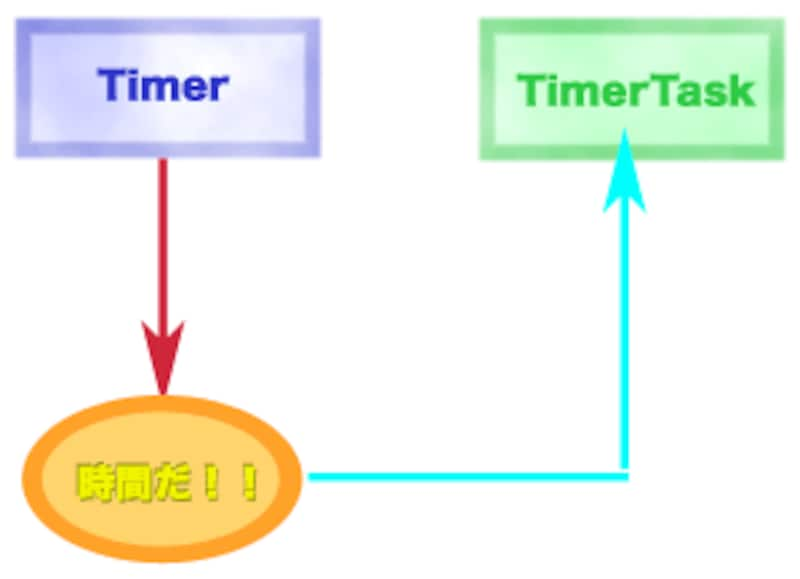 |
| Timerを使うと、指定の時間が経過すると用意されたTimerTaskの処理を実行することができる。 |
●下準備
まずTimerTaskを継承したクラスを用意します。その中にrunというメソッドを作成し、ここにタイマー機能で実行したい処理を書きます。
●タイマーの実行
タイマー機能を利用する際には、Timerインスタンスを作成します。その「schedule」というメソッドを利用して、用意しておいたTimerTaskクラスのインスタンスの実行スケジュールを設定します。これで、設定した時間が経過するとTimerTaskのrunが自動的に実行されるようになります。
この手順を見ればわかるように、タイマーを利用するためには、作成するプログラムのクラスの他にTimerTaskクラスを用意しないといけません。これは別クラスとして用意してもいいですが、サブクラスとして作成してもよいでしょう。では、実際に簡単な利用例をあげておきましょう。
import java.awt.*;
import java.text.*;
import java.util.*;
import java.util.Timer;
import javax.swing.*;

public class Sample extends JFrame {
       JLabel label;

       public static void main(String[] args) {
              new Sample();
       }

       public Sample() {
              this.setSize(200,100);
              this.setLayout(new BorderLayout());
              label = new JLabel();
              label.setFont(new Font("Dialog",
                            Font.BOLD,24));
              this.getContentPane().add(label,
                            BorderLayout.CENTER);
              Timer t = new Timer();
              t.schedule(new MyTimer(),0,500);
              this.setVisible(true);
       }

       class MyTimer extends TimerTask {
              boolean f = false;

              public void run(){
                     String delim = f ? ":" : " ";
                     f = !f;
                     String str = "hh" + delim +
                                   "mm" + delim + "ss";
                     SimpleDateFormat sf =
                                   new SimpleDateFormat(str);
                     GregorianCalendar cal =
                                   new GregorianCalendar();
                     label.setText(sf.format(cal.getTime()));
              }
       }
}
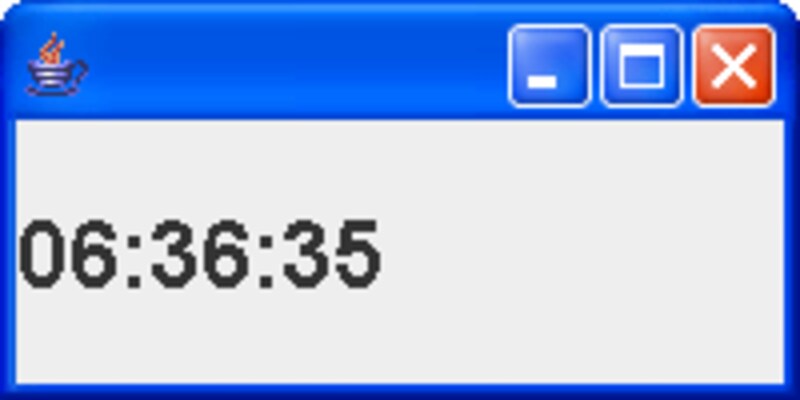 |
| 実行すると、JLabelに現在の時刻がリアルタイムに表示される。 |
JFrameの中にJLabelを用意し、タイマー機能を使って定期的に現在の時刻を表示させています。MyTimerというクラスが、実行する処理のクラスです。このrun内で、SimpleDateFormatとGregorianCalendarを使って現在の時刻をJLabelに表示しています。
このMyTimerを、Timerインスタンスで実行するための処理が「schedule」というメソッドの部分です。このメソッドは、実行するTimerTaskインスタンス、スタートするまでの待ち時間、繰り返し呼び出す際の間隔を引数に指定しています。
ちなみに、タイマーの機能を停止するには、Timerインスタンスの「cancel」メソッドを呼び出します。




![[MIDlet] ソースコードの基本を理解する](https://imgcp.aacdn.jp/img-a/156/auto/aa/gm/article/8/0/7/3/6/topimg.jpg)